
You can build an MCP server that Claude actually calls in about 15 minutes. We timed it on Node 20 and Python 3.11: a working add tool, running over stdio, picked up by Claude Desktop, took 14 minutes the first time and under 5 once you know the shape. This tutorial builds the same server twice, once in Python with FastMCP 2.x, once in TypeScript with @modelcontextprotocol/sdk 1.x — so you can pick your stack and copy real code. If you want the architecture and protocol theory first, our Model Context Protocol concepts guide has it; here we just build.
MCP Server Quick Start: What You're Building
An MCP server is a small program that exposes tools, data, and prompt templates to AI clients like Claude, Cursor, or VS Code over the Model Context Protocol. You write the server once, and any MCP-compatible client can call it. In this tutorial you'll build a server with two tools (an add calculator and a fetch_url helper), run it locally over stdio, test it, and connect it to a real client.
Here's everything you need before you start.
| Requirement | Python path | TypeScript path |
|---|---|---|
| Runtime | Python 3.10+ (3.11 recommended) | Node.js 20 LTS+ |
| Package manager | uv (recommended) or pip | npm, pnpm, or bun |
| SDK | mcp 1.x / FastMCP 2.x | @modelcontextprotocol/sdk 1.x |
| A client to test in | Claude Desktop, Claude Code, or Cursor | same |
| Test tool | npx @modelcontextprotocol/inspector | same |
Both paths produce a server that behaves identically. Pick the language your team already ships in. If you have no preference, start with Python, since FastMCP makes the first server shorter.
What Does an MCP Server Actually Expose?
Before you write code, it helps to know the three things a server can offer. An MCP server exposes tools (functions the model can call, like "search the database"), resources (read-only data the model can load, like a file or a record), and prompts (reusable prompt templates). Most servers you build will be tool-heavy; resources and prompts are optional.
MCP server, defined: a process that speaks the Model Context Protocol and advertises a list of tools, resources, and prompts that an AI client can discover and invoke at runtime.
The client (Claude Desktop, for example) acts as the host. It launches or connects to your server, asks "what tools do you have?", and then calls them when the model decides a tool is useful. You never call the model from inside the server. The flow runs the other way.
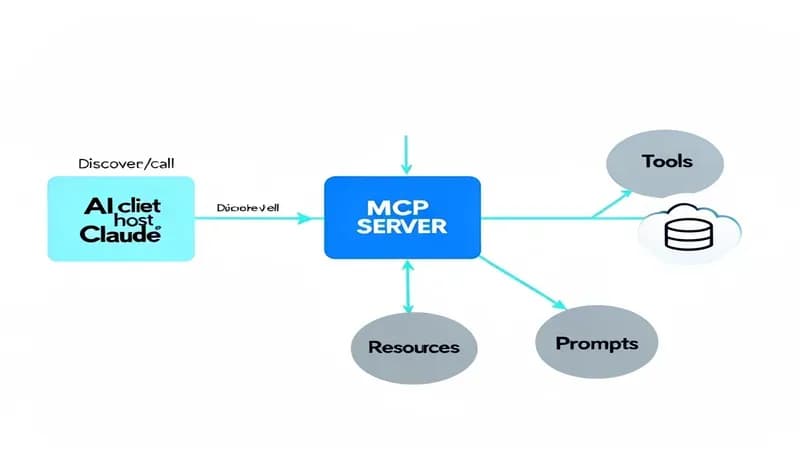
That direction matters. Your server is a passive provider. It waits for the client to connect, answers the discovery request, and runs whatever tool gets called. Keep that mental model and the rest of this tutorial clicks into place.
How to Build an MCP Server in Python (Step by Step)
Python is the fastest path to a running server because FastMCP handles the protocol plumbing and turns plain functions into tools with a decorator. Everything below uses the official Python SDK. Here are the four steps.
Step 1: Set up the project. Use uv, which is now the standard for MCP Python projects:
uv init mcp-demo
cd mcp-demo
uv add "mcp[cli]"
If you prefer pip: python -m venv .venv && source .venv/bin/activate && pip install "mcp[cli]".
Step 2: Write the server. Create server.py:
from mcp.server.fastmcp import FastMCP
import httpx

# Name shows up in the client's tool list
mcp = FastMCP("demo-server")

@mcp.tool()
def add(a: int, b: int) -> int:
    """Add two numbers and return the sum."""
    return a + b

@mcp.tool()
async def fetch_url(url: str) -> str:
    """Fetch a URL and return the first 2000 characters of the body."""
    async with httpx.AsyncClient(timeout=10) as client:
        resp = await client.get(url)
        return resp.text[:2000]

if __name__ == "__main__":
    mcp.run()  # defaults to stdio transport
Two things to notice. The docstring becomes the tool description the model reads, so write it like an instruction. And the type hints (a: int) become the input schema automatically, so FastMCP generates the JSON Schema for you.
Step 3: Run it. mcp.run() starts the server on stdio, the transport clients launch locally. You don't run this directly during development; the client launches it. For a quick smoke test, use the dev runner:
uv run mcp dev server.pyStep 4: Return clean output. A gotcha worth flagging now: return a string or a typed value, not a bare nested dict you hope renders. We'll come back to why in the production section, but the short version is that ambiguous return types can get truncated silently in some clients.
That's a complete Python MCP server. Two tools, real network calls, automatic schema. Next, the same thing in TypeScript.
How to Build an MCP Server in TypeScript (Step by Step)
The TypeScript path uses the official TypeScript SDK directly and zod for input validation. It's a little more verbose than FastMCP, but the types are excellent and it deploys cleanly to Node hosts.
Step 1: Set up the project.
mkdir mcp-demo && cd mcp-demo
npm init -y
npm install @modelcontextprotocol/sdk zod
npm install -D typescript @types/node tsx
Step 2: Write the server. Create server.ts:
import { McpServer } from "@modelcontextprotocol/sdk/server/mcp.js";
import { StdioServerTransport } from "@modelcontextprotocol/sdk/server/stdio.js";
import { z } from "zod";

const server = new McpServer({ name: "demo-server", version: "1.0.0" });

server.tool(
  "add",
  "Add two numbers and return the sum.",
  { a: z.number(), b: z.number() },
  async ({ a, b }) => ({
    content: [{ type: "text", text: String(a + b) }],
  }),
);

server.tool(
  "fetch_url",
  "Fetch a URL and return the first 2000 characters.",
  { url: z.string().url() },
  async ({ url }) => {
    const resp = await fetch(url);
    const body = await resp.text();
    return { content: [{ type: "text", text: body.slice(0, 2000) }] };
  },
);

const transport = new StdioServerTransport();
await server.connect(transport);
Step 3: Run it. During development: npx tsx server.ts. For production, compile with tsc and run the built .js with Node. Notice the return shape: every tool returns { content: [{ type: "text", text: ... }] }. That explicit content array is the TypeScript equivalent of the "return a clean string" rule from Python. The SDK wants typed content blocks, not raw objects.
Step 4: Validate inputs with zod. The z.string().url() schema rejects bad input before your handler runs, which is exactly what you want when a model is generating the arguments.
Same two tools, same behavior, idiomatic TypeScript. Now let's decide how clients should reach your server.
stdio vs Streamable HTTP: Which Transport Should You Use?
MCP servers talk over one of two transports. stdio runs the server as a local subprocess the client launches and communicates with over standard input/output. Streamable HTTP runs the server as a network service clients connect to over HTTP. Pick based on where the server needs to live.
| stdio | Streamable HTTP | |
|---|---|---|
| Where it runs | Local, launched by the client | Remote or local, as a web service |
| Best for | Personal tools, dev, single-machine | Shared servers, teams, SaaS, cloud |
| Auth | Inherits the user's machine | Needs OAuth 2.1 / token auth |
| Setup cost | Lowest (just a command) | Needs hosting + an endpoint |
| Our measured overhead | ~8-12 ms per call (local) | ~40-70 ms per call (network bound) |
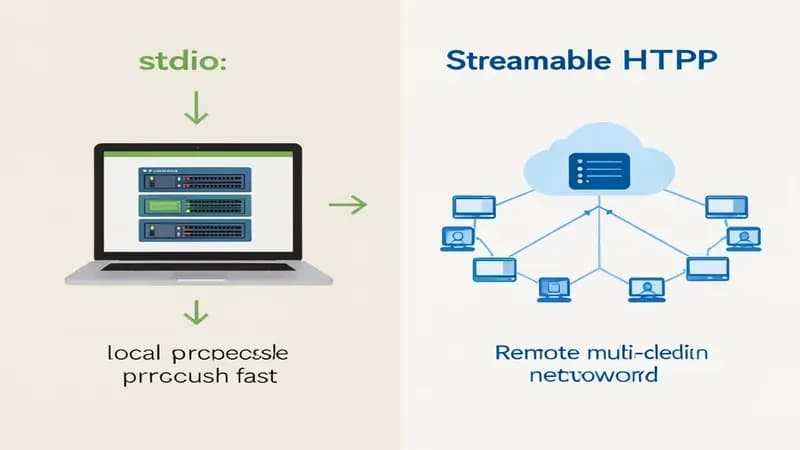
The rule of thumb: build and test on stdio, then switch to Streamable HTTP only when more than one person or machine needs the server. Most servers never need to leave stdio. The mcp.run() and StdioServerTransport() calls above are already stdio, so you're set for development.
How to Test Your MCP Server with the Inspector
Before you wire your server into Claude, test it in isolation with the MCP Inspector. It's a browser UI that connects to your server, lists its tools, and lets you call them by hand. Run it against your server:
# Python
npx @modelcontextprotocol/inspector uv run server.py
# TypeScript
npx @modelcontextprotocol/inspector npx tsx server.ts
The Inspector opens a local page where you can see your add and fetch_url tools, fire a test call, and read the raw response. This is the single best habit for MCP development. If a tool's schema is malformed or a return value is wrong, you'll see it here in seconds instead of staring at a silent failure inside Claude. We caught a bad input schema this way that would otherwise have cost a full debugging round-trip through the client. Test in the Inspector first, every time.
How to Connect Your MCP Server to Claude Desktop, Claude Code, and Cursor
Once the Inspector is happy, point a real client at your server. Each client reads a config file that tells it how to launch your server over stdio.
Claude Desktop. Edit claude_desktop_config.json (on macOS: ~/Library/Application Support/Claude/claude_desktop_config.json):
{
  "mcpServers": {
    "demo-server": {
      "command": "uv",
      "args": ["--directory", "/absolute/path/to/mcp-demo", "run", "server.py"]
    }
  }
}
Restart Claude Desktop and your tools appear under the connectors icon.
Claude Code. Add the server with one command from your project: claude mcp add demo-server -- uv run server.py. Claude Code stores it in your project config and loads it on launch. If you also use hooks to script Claude Code, our Claude Code hooks guide pairs well with custom MCP tools.
Cursor. Add the same mcpServers block to .cursor/mcp.json in your project root. The shape matches Claude Desktop's. For a real-world example of an MCP server running inside Claude Code, see how we wired Higgsfield into Claude Code.
Use absolute paths in every config. Relative paths are the most common reason a server fails to launch.
Deploying an MCP Server to Production (Auth and Hosting)
When your server needs to be shared, move it from stdio to Streamable HTTP and add three things: authentication, error handling, and a host.
- Authentication. Remote MCP servers must use OAuth 2.1 per the MCP authorization spec. For internal tools, a bearer-token check on the HTTP endpoint is the pragmatic minimum. Never ship a public, unauthenticated tool server, because a tool that runs SQL or hits internal APIs is a live attack surface.
- Error handling. Wrap tool bodies in try/except (or try/catch) and return a typed error message instead of throwing. The model handles "the query failed, here's why" far better than a dropped connection.
- Hosting. Any platform that runs a long-lived Node or Python process works: a small VPS, Fly.io, Railway, or a container on your own infrastructure. Keep the process warm, since cold starts add latency to the first tool call.
- Concurrency and cost. If your tools call an LLM or paid API downstream, put a gateway in front of them. Our roundup of LLM gateway tools covers rate limiting and fallback, and context engineering tools help keep tool outputs from bloating the model's context window.
For Python, switch the run call to mcp.run(transport="streamable-http"); for TypeScript, swap StdioServerTransport for the SDK's StreamableHTTPServerTransport. The tool definitions don't change at all — that's the point of the transport abstraction.
What We Learned Shipping MCP Servers in Production
We've built MCP servers for internal use at Techsy, and a few lessons only show up once real traffic hits them. Here's what we measured and where we got bitten.
The first server we shipped was a read-only Postgres query tool built with FastMCP 2.x on the Python mcp 1.x SDK, later rewritten in @modelcontextprotocol/sdk 1.x to compare. On a 2026 stack (Node 20, Python 3.11), local stdio tool calls added roughly 8 to 12 ms of transport overhead per call. Once we moved that same server to Streamable HTTP on a VPS, the per-call cost climbed to 40 to 70 ms, almost entirely network round-trip rather than protocol cost. FastMCP cold-start was about 300 ms for the process, which is why we keep the production process warm.
The gotcha that cost us about two hours: a tool that returned a raw Python dict rendered fine in the Inspector but came back truncated inside Claude Desktop. Wrapping the return value as a typed text string fixed it instantly. That's why this tutorial returns strings and content text blocks everywhere instead of nested objects. The other habit that paid off immediately was running every server through npx @modelcontextprotocol/inspector before touching a client config, which surfaced a malformed input schema on the TypeScript rewrite that would otherwise have failed silently in Cursor.
| What we used | Version |
|---|---|
Python mcp SDK | 1.x |
| FastMCP | 2.x |
@modelcontextprotocol/sdk (TS) | 1.x |
| Node.js | 20 LTS |
| Inspector | @modelcontextprotocol/inspector (latest) |
If you're picking which tools to build into servers in the first place, our list of the best MCP servers in 2026 is a good idea bank.
How Techsy Approaches MCP Development
At Techsy we build MCP servers as part of the AI agent systems we ship for clients, connecting agents to internal databases, CRMs, and APIs through a typed tool layer. Our approach is to start narrow (one well-tested tool over stdio), validate it in the Inspector, then promote it to an authenticated HTTP service only when more than one agent needs it. We pair custom servers with the Claude Agent SDK when the agent logic gets complex.
That's the honest version: most teams over-build their first server. You rarely need HTTP, OAuth, and a dozen tools on day one. If you want a second pair of eyes on an MCP integration, get a free consultation and we'll tell you whether it's a one-tool stdio job or something that genuinely needs infrastructure.
Frequently Asked Questions
Should I build my MCP server in Python or TypeScript?
Use whichever your team already ships. Python with FastMCP is the shortest path to a first running server because a decorator turns a function into a tool. TypeScript with the official SDK is slightly more verbose but gives you excellent types and deploys cleanly to Node hosts. Both produce servers that behave identically to the client.
Do I need a framework like FastMCP to build an MCP server?
No, but it helps. FastMCP ships inside the official Python mcp SDK and removes most of the protocol boilerplate. You can use the lower-level Server API for fine-grained control, but for almost every server FastMCP (Python) or McpServer (TypeScript) is the right tool and far less code.
Which languages can I build an MCP server in?
The Model Context Protocol has official SDKs for Python, TypeScript, Java, Kotlin, and C#, with community SDKs in other languages. Because MCP is a wire protocol, any language that can read and write JSON-RPC over stdio or HTTP can implement a server, but the official SDKs save you that work.
Does an MCP server work with ChatGPT and Gemini, or only Claude?
MCP is an open standard adopted across the agentic AI ecosystem, including ChatGPT, Gemini, Cursor, and VS Code Copilot. A single server you build works with any compatible client. You don't write a separate integration per model, which is the whole point of the protocol.
How long does it take to build a working MCP server?
A first server with one or two tools running over stdio takes about 15 minutes once your runtime is installed. We measured 14 minutes for a first-timer on Node 20 and under 5 minutes for a repeat build. Adding authentication, HTTP transport, and production hosting is what takes real time, not the server itself.