![Multilingual AI SEO: Internal Linking, Hreflang, and Translation Automation Guide in 10 Languages [2026]](/_next/image?url=https%3A%2F%2Fmedia.techsy.io%2Ftechsy-io%2Fsanity-asset-70f41d7527a8ab01b1c460ee3a9348246d66c4bd-1376x768-1200x630.jpg&w=3840&q=75)
Multilingual AI SEO internal linking is the area where every business going global is silently losing traffic. According to Ahrefs data, 75% of multilingual sites have hreflang errors — and most of those errors come from gaps in internal link structure. Even more striking: 31% of international sites have conflicting hreflang directives (Search Engine Land). This guide covers both the root causes of these problems and the AI SEO-powered autonomous solutions to fix them, step by step.
Multilingual SEO: Core Requirements for Ranking in Google Across 10 Languages
Multilingual SEO is the complete set of technical and content optimizations that ensure a website is correctly indexed, ranked, and reaches its target audiences across multiple languages in search engines. Hreflang tags, language-based URL structure, localized keyword research, and intra-language internal linking are the core components of this work. It doesn't end with translating content — the technical side of your international SEO infrastructure is just as important as the content itself.
Why Is Internal Linking Critical?
Internal linking is critical in multilingual SEO because each language version has its own PageRank pool, and without a proper internal link structure, no language version can achieve strong search rankings. On a site with 500 pages across 10 languages, internal link errors create a chain reaction that affects every language version.
What Is Internal Linking?
Internal linking refers to the connections between pages within the same domain. It serves four core functions: PageRank distribution, crawl budget direction, user experience improvement, and topical authority building. On multilingual sites, each language version must build its own internal link network independently. The core functions of internal linking are:
- PageRank distribution: Transfers link equity from strong pages to weaker ones
- Crawl budget direction: Ensures Googlebot crawls your site efficiently
- User experience: Guides visitors to relevant content
- Topical authority: Builds topical authority by clustering related pages together
Simple for One Language, a Nightmare for Ten
Internal linking for a single-language site is relatively straightforward. If you have 50 pages, you map out their relationships and create the links. But what if you're managing multilingual website SEO? Your 50 pages suddenly become 500 pages across 10 languages. Each page needs correct links within its language group, hreflang annotations, and canonical tags. A single URL change in one language affects the other 9. When you consider that 75% of consumers prefer content in their local language (junia.ai), building multilingual structure correctly is not just a technical requirement — it's a decision with direct revenue impact.
7 Critical Technical SEO Issues on Multilingual Sites and AI Solutions
The 7 most common technical SEO problems on multilingual sites are:
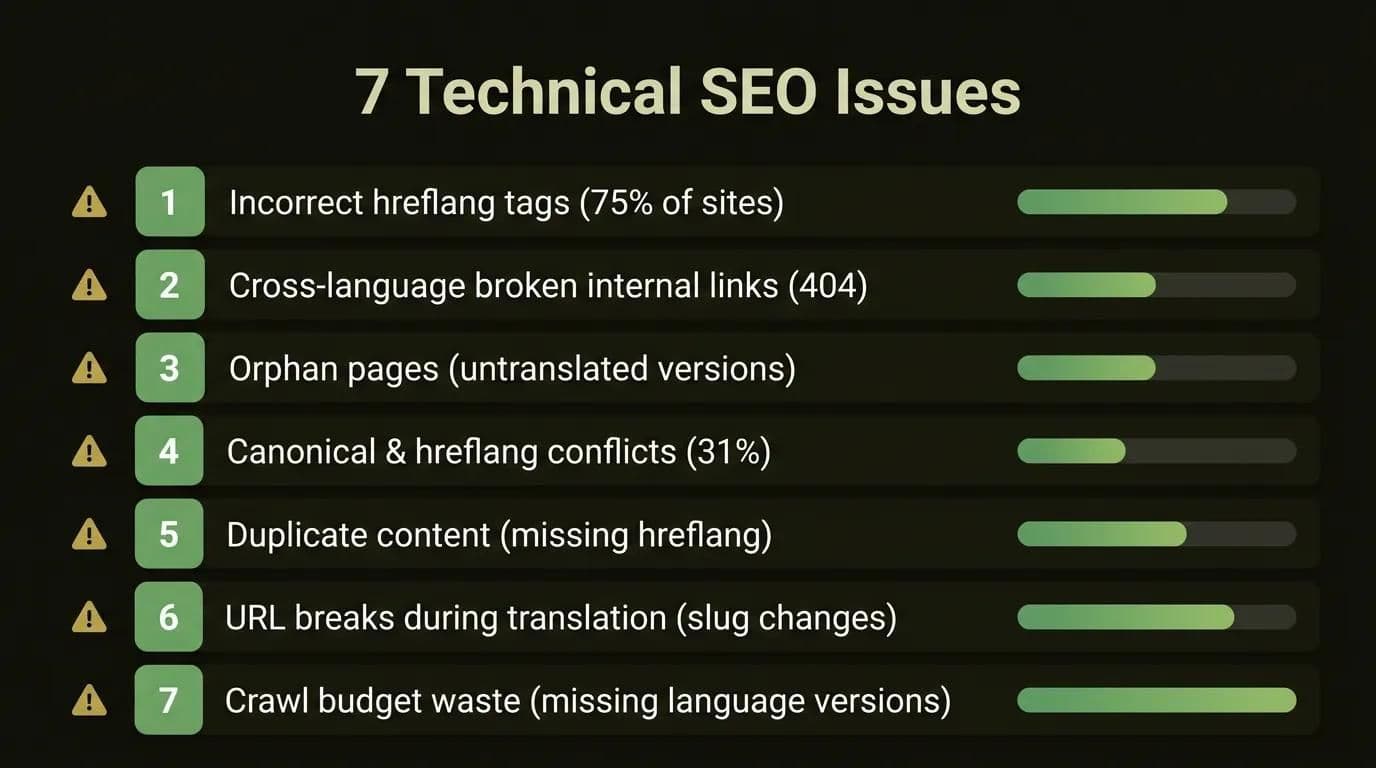
- Incorrect or missing hreflang tags — Present on 75% of multilingual sites; missing x-default, wrong language codes, or asymmetric references are the most common errors.
- Broken cross-language internal links — A URL change in one language breaks references in other languages, causing 404 errors.
- Orphan pages (untranslated language versions) — Some pages are only translated into a few languages, leaving the rest as orphans that Google treats as low-quality.
- Canonical and hreflang conflicts — If canonical points to one URL and hreflang to another, Google doesn't know which to trust. This problem has been detected on 31% of international sites.
- Duplicate content (incorrect hreflang annotation) — When hreflang is missing, Google treats similar content in different languages as duplicates.
- URLs broken or changed during translation — Slug translations break URL structure and invalidate all old references.
- Missing language versions wasting crawl budget — Googlebot wastes budget trying to crawl language versions that don't exist.
Most of these problems, as we detail in our post on agency limitations and AI advantages, arise in areas where manual control processes fall short.
The common thread across all 7 issues: each requires scalable, automated monitoring in the multilingual SEO internal linking infrastructure. Manually tracking these issues on a 500-page site across 10 languages is practically impossible.
Most problems trigger each other. For example, issue #6 (broken URLs) automatically creates issue #1 (missing hreflang) and issue #2 (broken internal links). This chain reaction cannot be kept under control without production-tested monitoring systems.
How Do You Build an Internal Link Architecture for a Multilingual Site?
Follow these 6 steps to build internal link architecture for a multilingual site:
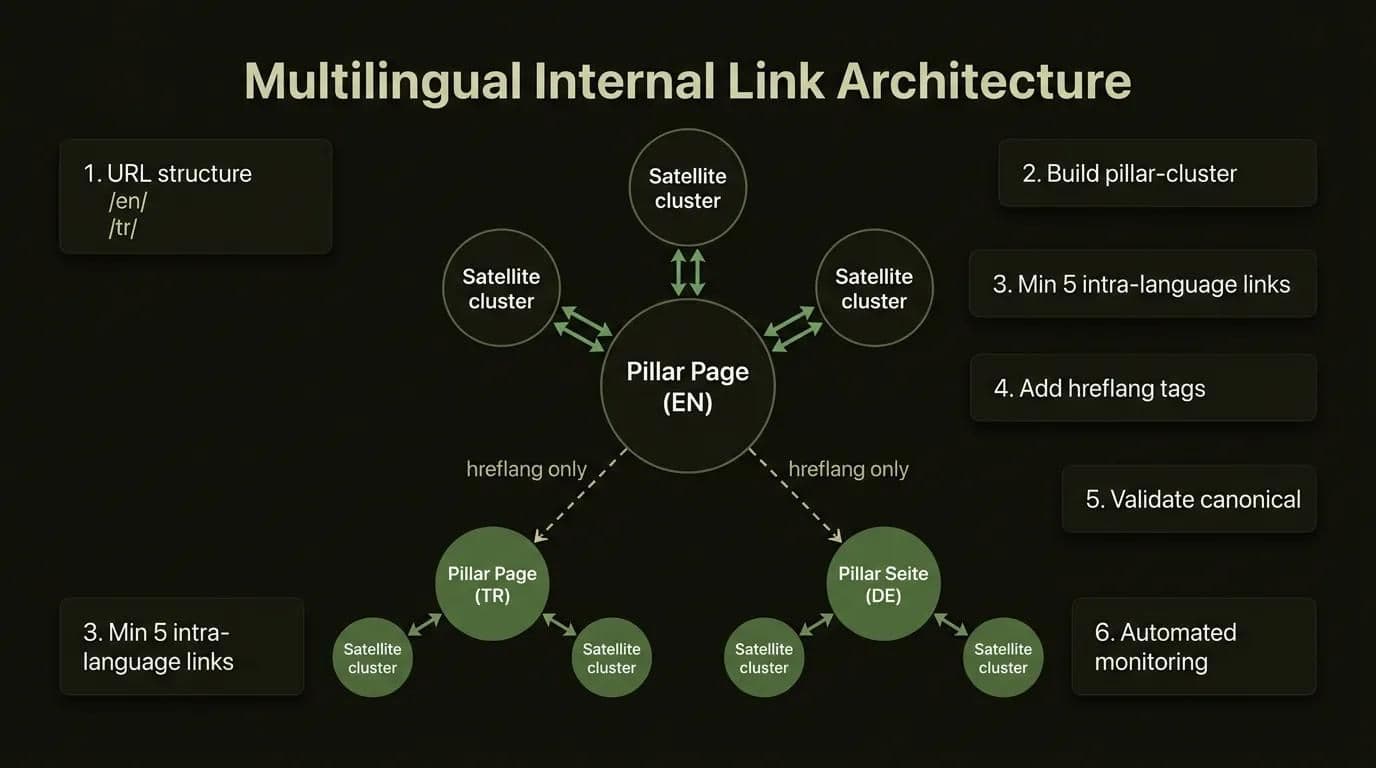
- Define your URL structure — Prefer the subdirectory model (/tr/, /en/, /de/); PageRank consolidates on a single domain.
- Build a pillar-cluster structure in every language — Create separate pillar pages and cluster pages in each language version.
- Create intra-language links — Target a minimum of 5 intra-language links in each language version; build links from pillar to cluster, cluster to pillar, and horizontal links between cluster pages.
- Add hreflang tags — Provide cross-language navigation through hreflang tags, not body links; always include the x-default tag.
- Validate canonical tags — In each language version, the canonical tag must point to its own URL.
- Set up automated monitoring — Integrate hreflang validation and broken link checks into your CI/CD pipeline.
For detailed autonomous SEO practices, we also recommend checking out our autonomous SEO strategy guide. You'll find the details of each step below.
What Is the Difference Between Intra-Language Links and Cross-Language Links?
On a multilingual site, an intra-language link is a body link between pages of the same language version — it distributes PageRank. A cross-language link is a technical connection between different language versions established via hreflang tags in the head section — it handles user language routing. Confusing these two link types causes serious SEO problems.
| Criterion | Intra-Language Link | Cross-Language Link |
|---|---|---|
| Purpose | PageRank/equity distribution | User language routing |
| Method | Anchor text in body | Hreflang tag in head |
| Control | Editorial decision | Technical automation |
| Error risk | Low | High (75% rate) |
The core rule: Cross-language navigation is provided via hreflang tags, not body links. You should not add a body link like "Click here for English version" inside a Turkish article. This confuses search engines and unnecessarily splits link equity.
How Do You Apply Content Cluster Structure to a Multilingual Site?
To apply content cluster structure to a multilingual site, you need to build the same pillar-cluster structure in every language. Create a separate pillar page in each language version, link cluster pages to that language's pillar, and provide cross-language navigation through hreflang tags — not body links. This approach is among the most effective multilingual SEO best practices:
- Pillar page: Create a separate pillar in each language. If you have a Turkish "Health Tourism Guide" pillar, English should have "Health Tourism Guide" and German "Gesundheitstourismus-Leitfaden."
- Cluster pages: Cluster pages in each language link to their language's pillar.
- Cross-language connection: Provided only through hreflang — not cross-language body links.
Based on our experience managing projects across 10 languages, each language version needs a minimum of 5 intra-language links. Specifically, a three-layer structure must be built: links from the pillar page to cluster pages, links from cluster pages back to the pillar, and horizontal links between cluster pages.
A practical tip: every time you publish a new page in any language, make it a habit to add a link to the new page from at least 3 existing pages in that language. This is the most effective way to prevent orphan pages from forming.
Subdomain or Subdirectory — Which Should You Use?
The best URL structure for a multilingual site is the subdirectory model (/tr/, /en/, /de/). With this structure, all PageRank consolidates on a single domain and language-based distribution is most efficient. With subdomain (tr.example.com), each subdomain is treated as a separate domain and link equity sharing weakens. The ccTLD model (example.tr) sends the strongest local signals but requires building separate authority.
Each language version has its own PageRank pool. If your Turkish pillar page is strong, that power only flows to the Turkish cluster — it doesn't automatically transfer to the English version. That's why:
- Independent link building strategies are needed for each language
- Orphan pages can't receive PageRank; untranslated pages drop from the index
- You need to monitor link equity distribution per language separately
Hreflang and Internal Linking: Correct Configuration Step by Step
The hreflang tag is an HTML tag that tells search engines which language and regional versions of a web page are available. It's added to the <head> section of the page, to the XML sitemap, or to the HTTP header, and it allows Google to show the correct language version to the right user. It's a distinctly different mechanism from internal linking, but when the two work together, your multilingual site's SEO performance multiplies.
It's a relationship similar to how database architecture and the application layer complement each other — much like we explored in our post on technical infrastructure comparison.
How Do You Use the Hreflang Tag?
The hreflang tag is implemented in 3 ways: HTML head tag (ideal for fewer than 20 language versions), XML Sitemap (recommended for many language versions), and HTTP Header (for non-HTML resources like PDFs, JS). Every language version must cross-reference all other versions, and the x-default tag must always be included. The right method depends on your site's scale:
| Method | Advantage | Disadvantage | Recommended Use |
|---|---|---|---|
| HTML head | Easy implementation | Increases page size | Fewer than 20 language versions |
| XML Sitemap | Bulk management | Crawl delay | More than 20 language versions |
| HTTP Header | Ideal for JS/PDF | Server configuration | Non-HTML resources |
For the HTML head method, a correct implementation looks like this:
<!-- In the Turkish page head section -->
<link rel="alternate" hreflang="tr" href="https://example.com/tr/hizmetler" />
<link rel="alternate" hreflang="en" href="https://example.com/en/services" />
<link rel="alternate" hreflang="de" href="https://example.com/de/dienstleistungen" />
<link rel="alternate" hreflang="x-default" href="https://example.com/en/services" />
One thing to watch: the x-default tag is mandatory. It determines which page is shown when the user's language doesn't match any of the available versions.
How Do You Resolve Hreflang and Canonical Conflicts?
Hreflang and canonical conflicts are resolved by ensuring the canonical tag in each language version points to its own URL. While hreflang shows other language versions as alternates, canonical should show the page's own URL. Accidentally pointing canonical to another language version breaks the entire hreflang chain. For example:
- Turkish page:
<link rel="canonical" href="https://example.com/tr/hizmetler" /> - English page:
<link rel="canonical" href="https://example.com/en/services" />
Accidentally pointing canonical to the English version across all languages breaks the entire hreflang chain. Google treats the page that canonical points to as the "master page" and may remove other language versions from the index.
How Is Internal Link Equity Preserved When Hreflang Is Correctly Implemented?
When the hreflang tag works correctly, each language version accumulates its own PageRank independently. When incorrectly implemented, link equity concentrates in a single language version while the others stay at zero. Having hreflang and internal link structure working in synergy is the foundation of multilingual website SEO performance. While these two mechanisms may seem independent, an error in one directly reduces the effectiveness of the other.
Translation Errors and SEO Loss: Automatic Detection and Correction with AI
Translation errors destroy SEO rankings in three fundamental ways: diacritics errors cause the loss of target keywords, truncation (content cutoff) leads Google to classify the page as thin content, and semantic drift fails to capture local search behavior and zeroes out organic traffic. Each of these three error types creates measurable damage:
Does Machine Translation Harm SEO?
Machine translation, if done incorrectly, causes serious harm to SEO. The most common issue is diacritics errors: in Turkish, "karşılaştırma" and "karsilastirma" are two different words to Google. When Turkish characters (ş, ç, ğ, ü, ö, ı) get converted to ASCII equivalents during translation, the target keyword is completely lost. The AI translation + human review model is the most efficient approach as of 2026. When character conversion happens during translation:
- The target keyword is lost
- Google matches the page to the wrong query
- User experience is severely degraded
This problem isn't unique to Turkish — French (é, è, ê), German (ä, ö, ü, ß), and Scandinavian languages (å, ø) face the same risk. In any translation pipeline without a diacritics validation layer, this error is inevitable.
Concrete example: if your target keyword is "Istanbul dental implant prices" and your translation system outputs "istanbul dis implanti fiyatlari," Google will never surface that page for the target keyword. Your keyword-based organic traffic for that language zeroes out.
Truncation (Cut-off Translations)
Long content can have its final sections cut off and lost during translation. On a Turkish article over 500 lines, a translation tool hits its output token limit and the FAQ section, conclusion paragraph, or CTA sections are dropped entirely. The result: the translated page has half the content of the source page, and Google classifies it as thin content.
Detecting truncation is straightforward: compare the H2 count in the source language to the translated version. If an 11-H2 article drops to 6 H2s after translation, the final sections have been cut. This check should be the first step in any translation quality assurance process.
Incorrect Keyword Targeting and Semantic Drift
Word-for-word translation fails to capture local search behavior. For example, the English phrase "dental implant cost" translated literally into Turkish becomes "diş implantı maliyeti" — but Turkish searchers write "diş implantı fiyatları." Semantic drift means failing to target the correct keyword, and your organic traffic drops to zero. This is exactly where the difference between localization and translation becomes clear: localization adapts content by understanding local search behavior, while literal translation just moves words into another language. On a site managed across 10 languages, doing separate keyword research for each language is a necessity — projects that skip this step can lose 60-80% of their organic traffic.
How Do You Fix Broken Links on a Multilingual Site?
Broken links on a multilingual site are created when a single URL change triggers a chain reaction across all language versions. To fix them: do a bulk crawl across all language versions, create a 301 redirect map, check the hreflang reference chain, and set up 24/7 monitoring with AI automation to catch issues within minutes. A single URL change can create 30-50 broken links across 10 languages.
This is where the importance of URL structure and deployment processes becomes clear — much like we covered in our post on hosting and deployment options.
Broken Links During Language Switching
Say you renamed your English /en/services page to /en/our-services. The consequences of that single change:
- All internal pages linking to
/en/servicesbreak - Hreflang references in all other 9 languages return 404
- Google's previously indexed URL becomes worthless
The Hreflang Reference Chain and the 404 Effect
When one language version returns a 404, the entire hreflang chain is affected. Google treats asymmetric hreflang references as invalid. So if the Turkish page points to the English version via hreflang but the English version returns 404, the Turkish page's hreflang also becomes invalid. This leads to crawl budget waste because Googlebot tries to repeatedly crawl pages that don't exist.
How Does a Single URL Change Affect 10 Languages?
On a multilingual site, a single URL change breaks all internal links in that language, drops hreflang references in the other 9 languages to 404, and also corrupts body cross-references in those languages. Total impact: 30-50 broken links from a single URL change. Consider a concrete scenario: you changed your Turkish site's /tr/hizmetlerimiz page to /tr/hizmetler. The chain effects of that single action:
- All internal links on the Turkish page break (5-10 links)
- Hreflang references in the other 9 languages return 404 (9 broken references)
- Internal links from pages in those 9 languages pointing to the
/tr/hizmetlerimizURL also break - Total impact: 30-50 broken links from a single URL change
With manual tracking, noticing this problem can take weeks. By the time it's noticed, Googlebot has already crawled those broken references multiple times, wasting your crawl budget. That's why automated broken link monitoring is a necessity on multilingual sites — not an option.
AI SEO Strategy for Autonomous Multilingual Site Management
AI-powered multilingual SEO provides automation in four core areas: hreflang validation (continuous 24/7 monitoring), broken link detection and automatic correction (immediate response), translation quality control (diacritics, truncation, and semantic validation), and internal link suggestion (automatic suggestions based on content cluster structure). Compared to manual processes, it reduces the operational burden by up to 90% and brings error rates to 0% within 72 hours.
The topic of AI SEO management in the Turkish market is barely covered anywhere. Let's compare the before and after of automation with concrete metrics.
How Do You Fix Hreflang Errors?
To fix hreflang errors, first do a full crawl of all language versions using Screaming Frog or Ahrefs Site Audit, add missing x-default tags, fix conflicting canonical/hreflang directives, and complete asymmetric references reciprocally in every language. With manual processes, this check happens once a month and errors go unnoticed for weeks. Autonomous SEO systems do 24/7 continuous monitoring: every time a new page is published, every time a URL changes, validation runs immediately. When an error is detected, an automatic alert is sent.
AI-Powered Broken Link Detection and Automatic Correction
According to clickrank.ai data, automation brought the average 8% broken URL rate down to 0% within 72 hours after implementation. A 15% increase in non-US organic traffic was recorded. These numbers show how effective AI-powered SEO tools can be on multilingual sites. For cost details, check out our post on the cost of autonomous SEO solutions.
Hreflang Validation with CI/CD Pipeline Integration
Integrating SEO automation processes into your development pipeline is an approach that nobody in the Turkish market has applied yet. Here's how it works:
- Automated hreflang validation test runs before every deployment
- Internal link integrity is checked every time a new translation is pushed
- If an error is detected, deployment is stopped and the developer is alerted
- Consistency across all 10 language versions is guaranteed
This approach catches problems before going live. Hreflang validation integrated into the development pipeline brings the probability of errors in production close to zero — just like unit tests catch code bugs before they go live.
Techsy's autonomous hreflang validation system runs automatic checks across 10 languages every time new content is published — in the manual agency model, this takes weeks.
Manual Agency vs. Autonomous AI SEO Comparison
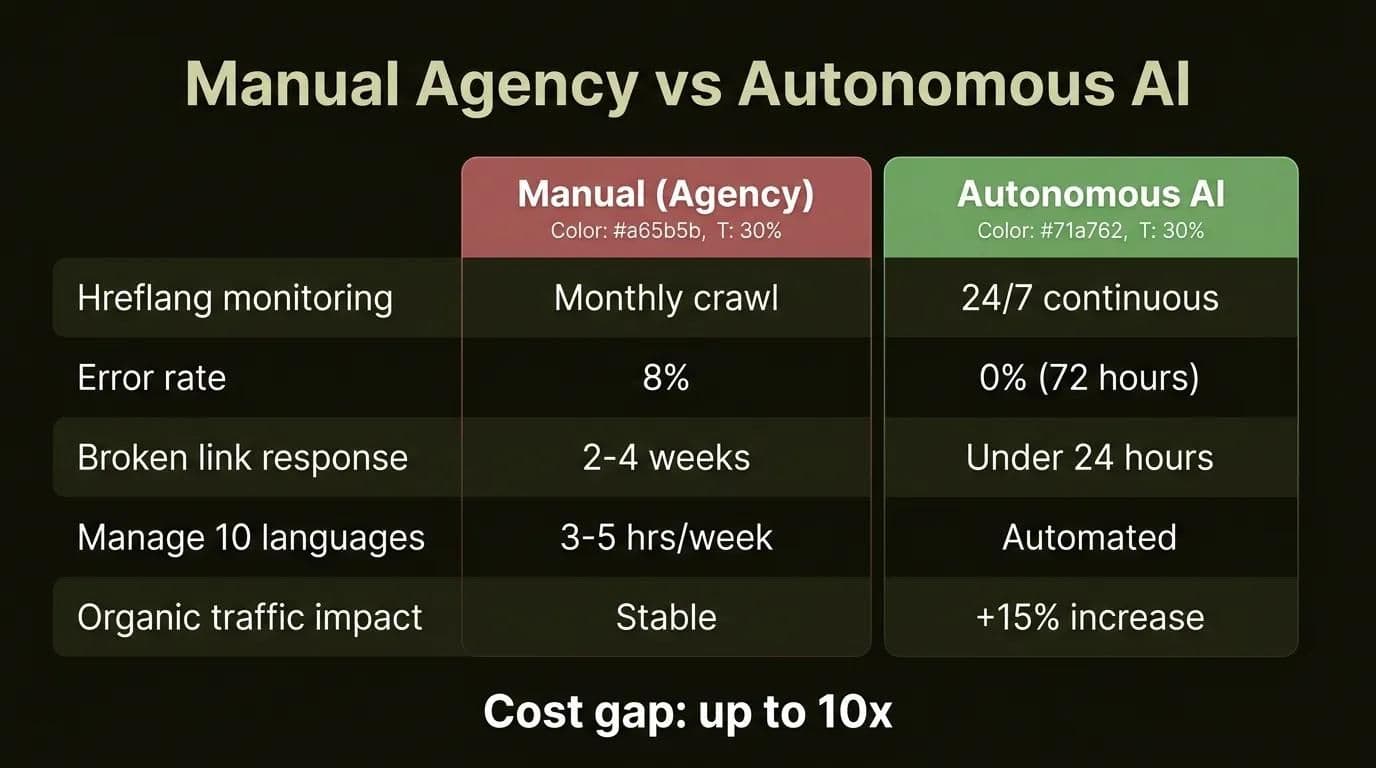
The table below shows the performance gap between a manual agency process and autonomous AI in managing multilingual SEO:
| Metric | Manual (Agency) | Autonomous AI |
|---|---|---|
| Hreflang monitoring frequency | Monthly crawl | 24/7 continuous |
| Error rate (average) | 8% | 0% (72 hours) |
| Broken link response time | 2-4 weeks | Under 24 hours |
| Time to manage 10 languages | 3-5 hours/week | Automated |
| Non-US organic traffic impact | Stable | +15% increase |
Let us audit your multilingual site's hreflang health and internal link structure for free — schedule a meeting here.
What Tools Are Used for Multilingual SEO?
The main tools used for managing multilingual SEO are Screaming Frog (hreflang control, ~$150/year), Ahrefs and Semrush (comprehensive internal link analysis, ~$100-120/month), Hreflang Tag Generator (free tag creation), Sitebulb (advanced technical analysis), and AI-based autonomous platforms (combining hreflang validation + broken link detection + internal link suggestions under one roof). Here's a detailed comparison of options on the market:
| Tool | Hreflang Check | Internal Link Analysis | Multilingual-Specific | Price (2026) |
|---|---|---|---|---|
| Screaming Frog | Yes | Yes | Limited | ~$150/year |
| Ahrefs | Yes | Advanced | Medium | ~$120/month |
| Semrush | Yes | Advanced | Medium | ~$100/month |
| Hreflang Tag Generator | Only | No | Yes | Free |
| Sitebulb | Yes | Advanced | Good | ~$100/year |
| AI-Based Platforms | Automatic | Automatic | Full | Variable |
Screaming Frog is the most accessible option cost-wise and is sufficient for small-to-medium projects. Ahrefs and Semrush offer more comprehensive analysis but have higher monthly costs. AI-based platforms combine hreflang validation, broken link detection, and internal link suggestions under one roof. The right choice depends on your project scale and budget — to be fair, Screaming Frog can be more than enough for a small site with 3-4 languages.
Pro tip: Instead of getting a separate tool for hreflang checks, activate the hreflang module in the SEO tool you're already using. If you have an Ahrefs or Semrush subscription, you can run hreflang audits at no extra cost. The hreflang checker feature is already in these tools; most users aren't even aware of it because they haven't activated this module.
Hreflang tag generator tools have an important limitation: they generate the tags but don't add them to your site. Ensuring the generated tags are placed in the right location and are consistent with other language versions is your responsibility. Autonomous platforms also automate these steps.
How Much Does 10-Language Website SEO Cost?
As of 2026, the cost of 10-language website SEO varies greatly by model: agency model approximately $20,000–$60,000/year, AI + human review model $7,000–$16,000/year, and the fully autonomous model $1,600–$5,000/year. The gap can reach 10x. The hybrid model (AI + human review) is the most balanced option for most mid-sized businesses.
We took a detailed look at how multilingual structure impacts patient acquisition in the health tourism sector in our post on multilingual patient acquisition approaches.
10-Language SEO Cost Comparison (2026)
The table below compares the annual total cost of ownership (TCO) of 10-language website SEO management across three different models:
| Cost Item | Agency (Manual) | AI + Human Review | Fully Autonomous |
|---|---|---|---|
| Content production (10 languages) | $16,000–$50,000/year | $5,500–$11,000/year | $1,600–$5,000/year |
| Hreflang management | $1,600–$5,000/year | $650–$1,300/year | Included |
| Broken link monitoring | $1,000–$2,000/year | $330–$650/year | Included |
| SEO tools | $800–$3,000/year | $800–$3,000/year | Included |
| Total (estimated) | $20,000–$60,000/year | $7,000–$16,000/year | $1,600–$5,000/year |
| Error risk | High (8%) | Low (2%) | Minimal (0%) |
As of 2026, these numbers are widening further with currency fluctuations and rising agency fees. In the fully autonomous model, the cost gap can reach 10x.
On a tight budget? 10 languages at once isn't required. Start with the 3 highest-potential languages, measure results, and scale gradually. The pragmatic approach is always the healthiest.
It's worth acknowledging the advantages of the agency model too: agencies are still valuable for strategic consulting and local market knowledge. The difference shows up in repetitive operational tasks — hreflang checks, broken link crawls, and content consistency are much better suited to automation.
The hybrid model (AI + human review) is the most balanced option for most businesses as of 2026. AI carries the operational burden, while human editors make strategic decisions and handle final quality control. With this approach, costs drop by 60-75% compared to a full agency model, while quality remains higher than a fully autonomous model.
Techsy's Autonomous Multilingual SEO Approach
This guide itself is published in 10 languages — we're experiencing multilingual SEO internal linking challenges and solutions firsthand. Techsy's multilingual site management approach consists of these steps:
- Autonomous hreflang validation: Every time new content is published, hreflang consistency is automatically checked across all language versions
- AI-assisted translation quality control: Diacritics errors, truncation, and semantic drift are validated in three separate layers
- Broken link monitoring and automatic correction: Redirect maps are instantly updated when URLs change
- CI/CD pipeline integration: Internal link integrity is tested across all language versions before deployment
- Internal link suggestions: Every time new content is published, automatic internal link suggestions are generated based on the existing content cluster structure
With a production-tested approach, our goal on projects with 500+ pages across 10 languages is to bring the hreflang error rate to zero and keep broken link response time under 24 hours.
Results: 500+ pages, 10 languages, zero hreflang errors, 200+ automatic corrections per month — all proven in production.
Let us run a free technical SEO audit of your website across 10 languages. Get a free consultation
Frequently Asked Questions (FAQ)
How do you do internal linking on a multilingual site?
For internal linking on a multilingual site, each language version must build its own internal link network independently. Turkish pages link to Turkish pages, English pages link to English pages. Cross-language navigation is provided through hreflang tags, not body links. Target a minimum of 5 internal links in each language and build your link hierarchy according to the pillar-cluster structure.
How do you use hreflang tags?
Hreflang tags are implemented in 3 ways: HTML head tag (recommended for fewer than 20 language versions), XML Sitemap (ideal for many language versions), and HTTP Header (for non-HTML resources like PDFs, JS). Every language version must cross-reference all other versions, and the x-default tag must always be included.
How do you fix hreflang errors?
First, crawl all language versions using Screaming Frog or Ahrefs Site Audit. Add missing x-default tags, fix conflicting canonical/hreflang directives, and reciprocally complete asymmetric references in every language. By integrating CI/CD pipeline checks, you can run automated validation on every deployment and prevent errors from recurring. Manual control is not sustainable with 5+ language versions.
Does machine translation harm SEO?
Yes, machine translation done incorrectly causes serious harm to SEO. The three most common problems are diacritics errors (loss of special characters), truncation (cutoff of long content), and incorrect keyword targeting (semantic drift). The AI translation + human review model is the most efficient approach as of 2026 — far more reliable than raw machine translation, much faster than full human translation.
Subdomain or subdirectory for multilingual sites?
In most cases, subdirectory (/tr/, /en/, /de/) should be preferred for multilingual sites. PageRank consolidates on a single domain and management is simpler. ccTLD (country code domain) only makes sense for very high-budget projects and situations requiring specific country targeting. Subdomain is generally the least recommended option because each subdomain is treated as a separate site.
How do you fix broken links on a multilingual site?
To fix broken links on a multilingual site, do a bulk crawl of all language versions to identify broken links, create a 301 redirect map, check the hreflang reference chain, and set up redirects for pages with changed slugs. A 404 in one language breaks the entire hreflang chain. AI automation with 24/7 monitoring to catch issues within minutes is the ideal solution.
How do you do multilingual SEO with AI?
AI-powered multilingual SEO is done by providing automation in four core areas: hreflang validation (automatic 24/7 control), broken link detection and correction (immediate response), translation quality control (diacritics, truncation, semantic validation), and internal link suggestions (automatic suggestions based on content cluster structure). Compared to manual processes, it reduces the operational burden by up to 90%.
How do you resolve hreflang and canonical conflicts?
Hreflang and canonical conflicts are resolved by ensuring the canonical tag in each language version points to its own URL. Hreflang shows other language versions as alternates; canonical shows the page's own URL. The problem stems from canonical being accidentally pointed to another language version — in this case, Google listens to canonical and may remove other versions from the index.
How much does 10-language website SEO cost?
The cost of 10-language website SEO varies by model as of 2026: Agency model approximately $20,000–$60,000/year, AI + human review model $7,000–$16,000/year, and the fully autonomous model $1,600–$5,000/year. The gap can reach 10x. Starting with 3 languages and scaling gradually is a budget-efficient starting strategy. The hybrid model is the most balanced option for most mid-sized businesses.
How do you solve the orphan page problem on a multilingual site?
To solve the orphan page problem on a multilingual site, do a content audit in each language version to identify untranslated pages, then either translate them or mark them with noindex. Add at least 3 internal links to the orphan page from existing pages. Orphan pages can be evaluated as low quality by Google and can lower the overall quality score of your entire site. Setting up a regular audit schedule prevents this problem from recurring.
How do you apply content cluster structure to a multilingual site?
To apply content cluster structure to a multilingual site, build the same pillar-cluster structure in every language. Both pillar pages and cluster pages should have counterpart content in every language. Create intra-language cluster links — not cross-language links: Turkish cluster pages link to the Turkish pillar, English cluster pages link to the English pillar.
What tools are used for multilingual SEO?
The main tools used for multilingual SEO are: Screaming Frog (~$150/year) and Ahrefs Site Audit for hreflang checks; Semrush and Sitebulb for internal link analysis; Hreflang Tag Generator (free) for hreflang creation; AI-based solutions as autonomous SEO platforms (combining hreflang validation + broken link detection + internal link suggestions under one roof). Tool selection depends on your site scale and budget.