![Enterprise AI Workflow Automation: A Strategic Growth Guide [2026]](/_next/image?url=https%3A%2F%2Fmedia.techsy.io%2Ftechsy-io%2Fsanity-asset-59353e5b64fdfce0979efbdbdd9ccedb3c3abcd8-1376x768-1200x630.jpg&w=3840&q=75)
70% of enterprise companies still rely on manual workflows, and that's pushing operational costs higher year after year. Enterprise AI workflow automation is a strategic transformation approach that hands off repetitive tasks to autonomous AI architecture, reducing human workload by 40-70%. This guide covers the ROI calculation framework, an n8n vs Make vs Zapier comparison, and a 90-day implementation roadmap.
Enterprise AI Workflow Automation: Why It's Non-Negotiable in 2026
Enterprise AI workflow automation is an enterprise automation architecture that goes beyond traditional rule-based automation — using AI's contextual decision-making and learning capabilities to make end-to-end business processes fully autonomous. The system doesn't just know "what to do"; it looks at data to decide "what it should do," detects anomalies, and routes dynamically.
Traditional automation tools operate on rule-based "if-then" logic, while AI-powered automation removes those limitations entirely.
That difference might sound small, but at enterprise scale it creates a massive impact. Think about an invoice approval process: traditional automation routes based on fixed rules, while AI-powered automation analyzes the invoice content to detect anomalies, learns from historical approval patterns, and routes dynamically based on a risk score.
What Is the Difference Between Traditional RPA and AI-Powered Automation?
The core difference between traditional RPA and AI-powered automation lies in the decision-making mechanism. RPA operates on fixed rules, while AI automation learns contextually and adapts. The table below compares both approaches across six critical dimensions:
| Feature | Traditional RPA | AI-Powered Automation |
|---|---|---|
| Decision logic | Rule-based (if-then) | Contextual and learnable |
| Unstructured data | Cannot process | Handles natural language, images, audio |
| Changing conditions | Requires manual update | Adapts automatically |
| Error handling | Stops, waits for human intervention | Finds an alternative path |
| Scalability | Linear (separate config for each process) | Exponential (learning transfer) |
| Setup time | Short (weeks) | Medium-long (months) but higher ROI |
What Is the Difference Between RPA, BPA, and AI Workflow Automation?
RPA (Robotic Process Automation) automates repetitive tasks, BPA (Business Process Automation) manages end-to-end processes, and AI Workflow Automation goes beyond both with contextual decision-making and autonomous learning. In short: RPA "knows how to do it," BPA "manages the process," and AI Workflow "decides what to do."
| Layer | Focus | Example | Limitation |
|---|---|---|---|
| RPA (Robotic Process Automation) | Repetitive tasks | Data entry, copy-paste, form filling | Cannot handle unstructured data |
| BPA (Business Process Automation) | End-to-end processes | Approval flows, document management | Limited decision-making capability |
| AI Workflow | Intelligent workflow orchestration | Contextual routing, anomaly detection, autonomous decision | Dependent on data quality, high initial investment |
In short: RPA "knows how to do it," BPA "manages the process," and AI Workflow "decides what to do." Understanding these three layers is the first step to defining the right scope for your enterprise AI workflow automation investment. Many companies start with RPA, but as they scale, the transition to the AI workflow layer becomes inevitable.
Why Now? The Enterprise AI Automation Imperative in 2026
Waiting is no longer an option. Companies that delay enterprise AI automation investments are falling into a measurable disadvantage against competitors in 2026. Why?
According to Gartner's 2026 projections, 20% of organizations will automate management processes with AI. Looking at Forbes data, leading companies generate 3.7x higher ROI from AI investments compared to competitors. Institutions like Commonwealth Bank of Australia (CBA) are investing approximately $2 billion annually in AI.
What Is Agentic AI?
Agentic AI consists of autonomous AI agents that, when given a specific goal, plan on their own, use tools, and achieve outcomes. Unlike traditional chatbots or automation bots, they understand context, make new decisions, learn, and complete multi-step tasks without human intervention. It is 2026's most defining enterprise AI trend, fundamentally transforming corporate workflows.
Imagine a customer complaint comes in: traditional automation follows a predefined flow. Agentic AI analyzes the complaint's context, pulls the customer's history from the CRM, scans similar cases, and autonomously applies the best solution. Softtech's 2026 reports and Sestek's Agentic CX Summit event show that this technology is being rapidly adopted in the Turkish market as well.
What Is Hyperautomation?
Hyperautomation is an enterprise automation architecture that, rather than automating a single process, combines multiple technologies — RPA, AI, machine learning, and process mining — to connect and autonomize all workflows end-to-end. Defined by Gartner as a strategic technology trend, hyperautomation has now entered the enterprise agenda.
State of Enterprise AI Adoption in Turkey
The pace of corporate digital transformation in Turkey varies by sector. Banking and telecommunications are in the lead; major Turkish banks have been actively using AI-powered chatbots and voice agents in customer service since 2024. Statements from the Kariyer.net CTO reveal that AI adoption in the HR sector is also gaining momentum.
However, there is still a significant automation gap in sectors like manufacturing, logistics, and healthcare. According to Ticaret Gazetesi data, companies adopting enterprise AI workflow automation in these sectors are managing to reduce overall operational costs by 20%. This means both a challenge and an early-mover advantage for enterprise companies in Turkey. Demand for AI automation training and enterprise AI training programs has also increased noticeably in 2026.
Which Business Processes Should Be Automated with AI?
AI business process automation creates value differently across every department. The five core application areas where enterprise AI automation delivers the highest ROI:
- Customer service and support automation — first response time reduced by up to 80%
- Sales and CRM processes — lead scoring, pipeline, and proposal automation
- Finance and accounting workflows — potential savings of 30,000+ hours annually
- HR and talent management — 62% reduction in repetitive HR tasks
- Supply chain and operations — 30-50% improvement in operational efficiency
Below we examine each of these five areas with concrete metrics.
Customer Service and Support Automation
Customer support processes are where enterprise AI automation delivers results fastest. With chatbot, voice agent, and ticket routing automation, first response time is reduced by up to 80%. In a project ERGO Insurance carried out with Microsoft, 60% of customer inquiries were fully automated.
Multilingual customer support automation is also a critical component of this area. In global operations, customer service AI automation solutions provide 24/7 uninterrupted service, radically reducing the need for human agents.
Sales and CRM Processes
Enterprise AI solutions create impact in three core areas of sales processes: lead scoring, pipeline automation, and proposal preparation. According to Bulutistan data, 75% of sales teams have started using some form of automation tool.
AI-powered CRM integration eliminates the time sales representatives spend on data entry and directs them toward real customer relationships. When integrated with social media marketing automation, the entire funnel from lead to close becomes autonomous.
Finance and Accounting Workflows
Finance processes such as invoice processing, monthly reporting, and compliance checks are the areas with the highest error costs. In Cineplex's AI automation project, savings of more than 30,000 hours annually were achieved.
With OCR and NLP technology, the process of automatically reading, classifying, and transferring invoices to the accounting system is reduced to minutes. Compliance checks can also be carried out in real time thanks to AI automation systems.
HR and Talent Management
Recruitment, onboarding, and performance evaluation are the repetitive tasks where HR departments spend the most time. According to Yapay Zeka Danışmanı data, AI automation can reduce repetitive HR tasks by 62%.
When CV screening and candidate pre-evaluation processes are automated with natural language processing (NLP), HR teams can focus on strategic talent management. Onboarding processes are also standardized with personalized AI assistants. AI-powered workflow automation is becoming a differentiating tool in the HR department, especially during high-volume hiring periods.
Supply Chain and Operations
Demand forecasting, inventory management, and logistics optimization are the operational areas where machine learning models create the most impact. Operational efficiency improvements generally range between 30-50%.
From hospital supply chains to retail logistics, applications like the healthcare sector automation example show how powerful sector-specific solutions can be. Demand forecasting models analyze historical sales data and seasonal patterns to minimize both excess stock and stockouts.
Each of these five areas can be implemented at a different maturity level within the scope of enterprise AI workflow automation. What matters is identifying your company's current operational pain points and starting with the area that will create the highest impact. From a cost optimization perspective, customer service and finance generally offer the fastest ROI.
n8n vs Make vs Zapier: Enterprise AI Automation Tool Comparison [2026]
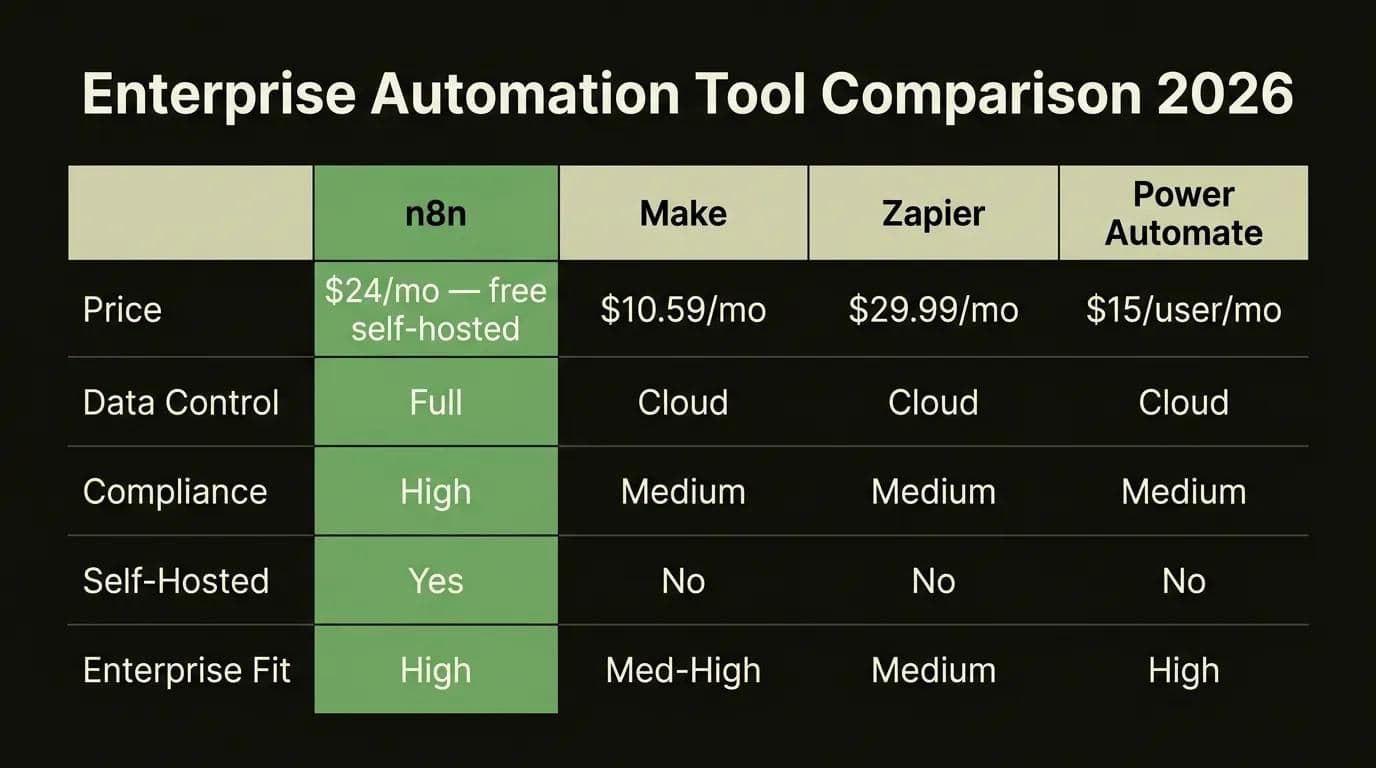
Enterprise automation software selection is a critical decision that directly determines the project's success. If data control and compliance are top priorities, n8n (self-hosted, open source) is the right choice; if you're in the Microsoft ecosystem, Power Automate; if you want a quick start, Make or Zapier are more pragmatic options. Below is the updated enterprise comparison as of 2026.
Open Source vs SaaS: Which Is Right for Enterprise?
For companies where data control and compliance are priorities, n8n (self-hosted, open source) is a strong choice. You can run it on your own servers and guarantee that data stays within your country's borders. For companies already heavily invested in the Microsoft ecosystem, Power Automate serves as a natural extension.
If you want to start with rapid prototyping and low technical debt, Make or Zapier are more pragmatic options. In our AI tech stack for SaaS guide, you can examine the position of these tools within a broader ecosystem.
n8n self-hosted setup requires Node.js and PostgreSQL knowledge. If your technical team has experience in these areas, you get the most flexible solution among enterprise workflow automation tools. If you're asking "should we choose an AI automation agency or build in-house?", the answer depends largely on your team's technical competence. It's worth noting that in-house setup has lower long-term costs, but external consulting support in the first phase is critically important. In the n8n vs Make vs Zapier comparison, "which is better?" is actually the wrong question. The right question is: "which is most compatible with our existing infrastructure and data requirements?"
What Are 2026 Workflow Automation Tool Prices?
Enterprise automation software pricing varies significantly by platform and scale. While n8n's self-hosted version is free, Zapier's enterprise plan goes up to $103.50/month. Here is the updated 2026 pricing table:
| Platform | Starting Price | Enterprise Price | Pricing Model | Self-Hosted | Enterprise Suitability |
|---|---|---|---|---|---|
| n8n | $24/month (Cloud) | Custom quote | Execution-based | Yes (free) | High |
| Make | $10.59/month | $34.12/month | Operation-based | No | Medium-High |
| Zapier | $29.99/month | $103.50/month | Task-based | No | Medium |
| Power Automate | $15/user/month | $150/user/month | User-based | No | High (MS ecosystem) |
| UiPath | Free (Community) | Custom quote | License-based | Yes | Very High (RPA + AI) |
Power Automate offers the fastest integration for companies in the Microsoft ecosystem; however, if you work with non-Microsoft systems, n8n or Make will be more flexible. To be objective here: there's no such thing as "the best tool" — there's the tool that best fits your needs.
When selecting enterprise workflow automation software, three core criteria to consider: data control (where will your data be stored?), integration breadth (compatibility with your existing CRM, ERP, and communication tools), and scalability (can you go from 100 workflows per day to 100,000?). The tool that gives a clear answer to these three questions is the right one for you.
One of the strongest aspects of these tools is CRM integration. Setting up an API-based integration between n8n and HubSpot takes approximately 2 hours. Using HubSpot CRM data as a trigger in your workflows -- for example, automatically sending an email + Slack notification when a new lead arrives -- is typically the first process enterprise companies automate.
Where Should Enterprise Companies Start with AI Automation?
When starting enterprise AI automation, choosing the right process directly determines the project's success. Scoring each process from 1-5 on repetition frequency, error cost, automation ease, and strategic impact axes, then starting a pilot with the highest-scoring process, is the most reliable approach. The C-Level decision matrix below offers a concrete prioritization framework for CEOs, CTOs, and COOs.
Process Prioritization Framework
Score each process from 1-5 on four axes:
| Process | Repetition Frequency | Error Cost | Automation Ease | Strategic Impact | Total Score | Priority |
|---|---|---|---|---|---|---|
| Invoice processing | 5 | 4 | 5 | 3 | 17 | High |
| Customer ticket routing | 5 | 3 | 4 | 4 | 16 | High |
| Monthly reporting | 4 | 4 | 4 | 3 | 15 | High |
| CV screening and pre-evaluation | 4 | 2 | 4 | 3 | 13 | Medium |
| Demand forecasting | 3 | 5 | 2 | 5 | 15 | High |
| Strategic planning | 1 | 5 | 1 | 5 | 12 | Low |
| Creative content production | 3 | 1 | 2 | 3 | 9 | Low |
Processes scoring 17 and above are candidates for immediate pilot launch. Medium-term planning for 12-16, and processes scoring below 12 should remain under human control. When you apply this matrix to your own company's processes, you'll generally find that processes like invoice processing and customer support routing rise to the top.
From Pilot Project to Enterprise Scale
A successful pilot project has three critical characteristics:
- Narrow scope: Start with a single department, a single process
- Measurable: Define KPIs before you start (processing time, error rate, cost)
- Fast results: Visible improvement expected within 4-8 weeks
When a pilot is successful, look for "ready to scale" signals: has the process reached 80%+ automation, is the error rate at an acceptable level, is user satisfaction positive? If yes, expand to other departments. In our AI agents for business automation guide, we examine in detail the process of autonomous agents going from pilot to scale.
AI Automation ROI: 40-70% Cost Reduction in Enterprise
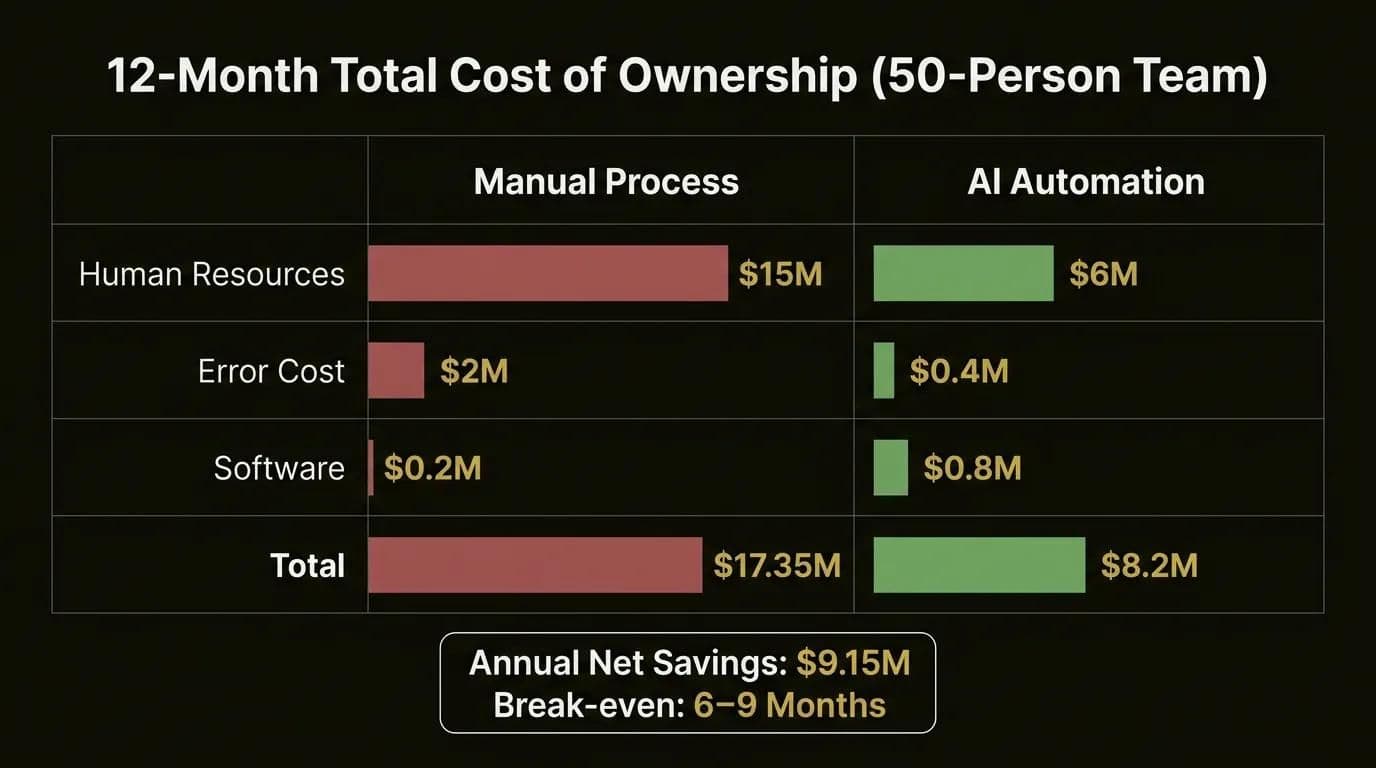
Enterprise AI workflow automation delivers 40-70% operational cost reduction depending on sector and scale. In a 50-person operations team, annual net savings can reach approximately 9 million TL, with a break-even point typically forming around 6-9 months. Below we present a framework for calculating ROI specific to your company.
12-Month TCO Model
Example total cost of ownership comparison for a 50-person operations team (as of 2026):
| Cost Item | Manual Process (TL/year) | AI Automation (TL/year) | Savings |
|---|---|---|---|
| Human resource cost (salary + benefits) | 15,000,000 | 6,000,000 | 9,000,000 TL |
| Software license/infrastructure | 200,000 | 800,000 | -600,000 TL |
| Consulting and implementation | 0 | 500,000 (one-time) | -500,000 TL |
| Maintenance and updates | 50,000 | 200,000 | -150,000 TL |
| Training | 100,000 | 300,000 | -200,000 TL |
| Error and delay cost | 2,000,000 | 400,000 | 1,600,000 TL |
| Total | 17,350,000 | 8,200,000 | 9,150,000 TL |
In this scenario, the annual net savings are approximately 9.15 million TL and the break-even point forms around 6-9 months. Of course, these figures vary by sector, scale, and the maturity level of your existing processes.
How many hours per month does your 50-person operations team spend on repetitive tasks? The answer to that question is the first step in estimating the potential return on your enterprise AI workflow automation investment. Important note: human resource cost is not just salaries. Benefits, management overhead, training cost, and the productivity loss caused by employee turnover must also be factored in.
Manual Process vs AI Automation: Annual Cost Comparison (Million TL)
Data table
| Cost Item | Manual Process | AI Automation |
|---|---|---|
| Human Resources | 15 | 6 |
| Software | 0.2 | 0.8 |
| Error Cost | 2 | 0.4 |
| Total | 17.35 | 8.2 |
Real-World ROI Examples
Production-tested data confirms that theory and practice align:
- ERGO Insurance: 60% of customer inquiries fully automated (source: Microsoft)
- Cineplex: 30,000+ hours of annual operational savings (source: Microsoft)
- Allync AI clients: 70% time savings, 50% cost reduction, 90% error reduction
- Forbes: Leading companies generate 3.7x higher ROI than competitors
- AI Consultant data: 40% cost reduction, 62% repetitive work reduction
- Ticaret Gazetesi: Overall operational cost reduction at 20% level
For a ROI calculation specific to your company, consult our experts; get a free automation analysis.
How Is AI Workflow Automation Implemented?
Enterprise AI workflow automation is implemented in three phases over 90 days:
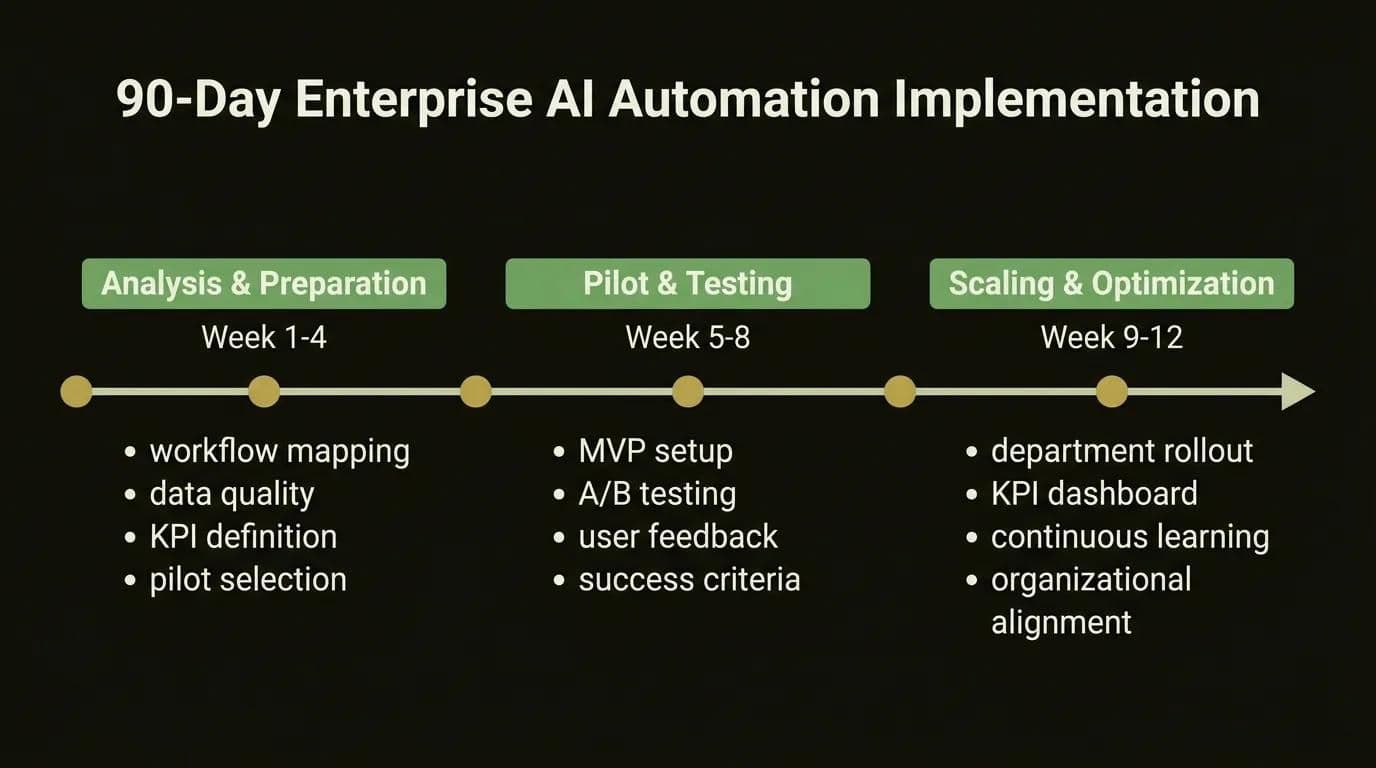
- Phase 1 (Weeks 1-4): Process analysis, data quality assessment, and pilot process selection
- Phase 2 (Weeks 5-8): MVP creation, A/B testing, and user feedback
- Phase 3 (Weeks 9-12): Scaling the successful pilot to other departments and KPI monitoring
Projects that start without a structured roadmap typically get stuck in "pilot purgatory": they create isolated automation islands that can't scale. The detailed plan below eliminates that risk.
Phase 1: Process Analysis and Data Preparation (Weeks 1-4)
- Current workflow mapping: Document critical processes across all departments. Identify bottlenecks with process mining tools.
- Data quality assessment: Check the accuracy, completeness, and accessibility of data required for automation. Create a data governance framework.
- KPI definition: Set baseline metrics for each process (processing time, error rate, cost).
- Pilot process selection: Use the decision matrix above to select the 1-2 highest-scoring processes.
In our enterprise AI transformation comprehensive guide, we cover the strategic dimension of this phase in more detail.
Phase 2: Pilot Project and Testing (Weeks 5-8)
- MVP creation: Set up the minimum viable automation solution for the selected process.
- A/B testing: Run the automated process in parallel with the manual process to compare.
- User feedback: Collect regular feedback from teams using the process and improve.
- Success criteria check: Is it meeting KPI targets? Is the error rate acceptable?
Phase 3: Scaling and Optimization (Weeks 9-12)
- Spreading the successful pilot: Expand to other departments and processes.
- KPI monitoring dashboard: Set up a monitoring panel for real-time performance tracking.
- Continuous learning loop: Monitor AI model performance, update training with new data. A culture of continuous improvement is the key to the long-term success of the automation project.
- Organizational alignment: Complete training programs and change management activities. It's critical that all departments understand and embrace the automation vision.
When these three phases are complete, your company will have moved from single process automation to enterprise-scale workflow orchestration. Processes are interconnected, data flows are seamless, and decision-making mechanisms operate autonomously.
5 Mistakes That Kill Enterprise AI Automation Projects and How to Fix Them
The three most common challenges in enterprise AI workflow automation projects:
- Data quality and integration barriers — legacy systems, data silos, and low data quality
- Change management and cultural resistance — employees' fear of "will I lose my job?"
- Data privacy compliance — personal data processing and data localization requirements
Workflow automation is not a solution for every problem, and acknowledging that is the foundation of credibility. Here are practical solutions to these challenges.
Data Quality and Integration Barriers
Problem: Integration with legacy systems (old ERP, CRM), data silos, and low data quality is the biggest reason automation projects fail.
Solution: Adopt an API-first approach. Use a middleware layer for CRM/ERP integration. The data cleansing project should start BEFORE the automation project. Starting automation without a data governance framework is like building on a rotten foundation.
Change Management and Cultural Resistance
Problem: Employees' fear of "will I lose my job?", resistance to automation investment at the management level.
Solution: Develop a workforce repositioning strategy. When automation takes over repetitive tasks, employees move toward strategic and creative work. Position this as "transformation" not "reduction." Training programs and internal communication campaigns are critically important. Successful companies involve employees in the process and ask them to help design it.
Data Privacy Compliance
Problem: Personal data processing during enterprise automation, regulatory obligations, and data localization requirements.
Solution: Guarantee the right of notification for individuals in automated decision-making processes. On-premise solutions (like n8n self-hosted) can be preferred for data localization. Also follow EU AI Act developments; Turkish companies working with the EU market may face additional compliance requirements from 2026 onward. Transparency and auditability must be core principles in enterprise AI applications.
Data security is not just a legal obligation — it's also a competitive advantage. Being able to say "your data is safe" to your customers and employees accelerates the company-wide acceptance of your automation project. Full transparency must be provided regarding which data decision support system AI models were trained on and how they make decisions.
Techsy's Approach: Optimizing Workload with Autonomous AI Architecture
Why Autonomous Architecture?
At Techsy, we prefer autonomous AI architecture over traditional RPA. The reason is simple: scaling rule-based automation is linear, while scaling autonomous agents is exponential. With a human-in-the-loop mechanism, critical decisions are submitted for human approval while routine workflows operate fully autonomously.
Our production-tested experience shows that the right architecture choice enables 2-3x more processes to be automated with the same budget. Generating efficiency with AI is not just a tool selection — it's an architectural decision. The infrastructure we've built on Supabase, Next.js, React, Node.js, and PostgreSQL enables seamless integration with different automation platforms.
Results for Our Enterprise Clients
Examples from our hands-on implementation experience:
- Operational cost: Average 45% reduction (within the first 12 months)
- Processing time: 70-80% reduction in critical processes
- Error rate: 85%+ reduction compared to manual processes
- Employee satisfaction: Measurable increase in teams freed from repetitive tasks
At Techsy, we've designed workflow automation for 15+ enterprise companies. Average results: 65% reduction in manual processing time, 90% drop in error rates, and 2.4M TL in annual operational savings. Let's map out your 90-day automation roadmap together.
Frequently Asked Questions (FAQ)
What Is Enterprise AI Workflow Automation?
Enterprise AI workflow automation is an enterprise automation architecture that goes beyond traditional RPA, using AI's contextual decision-making and learning capabilities to make end-to-end business processes fully autonomous. Instead of rule-based "if-then" logic, it works with intelligent decision mechanisms like anomaly detection, risk scoring, and dynamic routing. For example, in an invoice approval process, it doesn't just "route based on rules" — it applies "detect anomaly, calculate risk score, route dynamically" logic.
How Does Workflow Automation Increase Productivity?
Workflow automation increases productivity in four fundamental ways: it eliminates repetitive manual tasks to provide 70% time savings, reduces human error by up to 90%, directs employees toward strategic and creative work, and provides operational continuity with 24/7 uninterrupted working capacity. As concrete metrics, a 50% cost reduction and an average 6-9 month return on investment are expected.
What Is the Difference Between RPA and AI Workflow Automation?
RPA (Robotic Process Automation) automates rule-based repetitive tasks: data entry, form filling, copy-paste. AI workflow automation adds natural language understanding, contextual decision-making, and autonomous learning capabilities, allowing it to work with unstructured data as well. The core difference: RPA is process-based and rule-driven, AI automation is data-driven and learning-capable. Short formula: RPA "knows how to do it", AI "decides what to do."
What Is the Difference Between Agentic AI and Traditional Automation?
Agentic AI consists of autonomous AI agents that, when given a specific goal, plan on their own, use tools, and achieve outcomes. While traditional automation is tied to a predefined rule chain, agentic AI can understand context to make new decisions, adapt to unexpected situations, and complete multi-step tasks without human intervention. It's 2026's most defining enterprise AI trend, fundamentally transforming corporate workflows.
How Much Does Enterprise AI Workflow Automation Save?
Enterprise AI workflow automation delivers 40-70% operational cost reduction depending on sector and scale. Real-world examples: at ERGO, 60% of customer inquiries were fully automated; Cineplex achieved 30,000+ hours of annual operational savings. Our 12-month TCO model for a 50-person operations team projects 9+ million TL net annual savings and a 6-9 month break-even point. For an analysis specific to your company, contact us.
Which Business Processes Should Be Automated with AI, and Which Should Not?
General rule: if a task is structured, repetitive, and rule-definable, it's suitable for AI automation. Processes that should be automated with AI:
- Invoice processing and approval flows
- Customer support ticket routing and initial responses
- Monthly reporting and data entry
- Document classification and CV screening
- Lead scoring and pipeline automation
Processes that should remain under human control: strategic decision-making, creative content production, complex negotiations, and customer interactions requiring high empathy.
Where Should Enterprise Companies Start with AI Automation?
Follow these steps to start with enterprise AI automation:
- Score your existing processes on repetition frequency, error cost, automation ease, and strategic impact
- Start a low-risk pilot with the 1-2 highest-scoring processes
- Measure and validate KPI targets within 4-8 weeks
- Scale the successful pilot to other departments with a 90-day roadmap
Typical starting points: invoice approval flows, customer support ticket routing, or reporting automation. The production-tested approach provides concrete ROI proof before large investments.
What Are the Legal Requirements for AI Workflow Automation?
In Turkey, AI workflow automation is subject to personal data processing rules under PDPL (Personal Data Protection Law No. 6698). Core requirements: guarantee the right of notification for individuals in automated decision-making processes, establish an explicit consent or legal basis mechanism, and comply with the principle of data minimization. On-premise solutions (like n8n self-hosted) can be preferred for data localization; cross-border data transfers in healthcare and finance sectors are subject to additional regulation. EU AI Act developments also create additional compliance requirements from 2026 onward for Turkish companies working with the EU market.
How Long Does It Take to Implement Automation Solutions?
Typical implementation timelines for enterprise AI automation solutions: 4-8 weeks for a pilot project, 12-16 weeks for enterprise scale. The 90-day implementation roadmap progresses in three phases: process analysis and data preparation (weeks 1-4), pilot implementation and KPI measurement (weeks 5-8), scaling and organizational adaptation (weeks 9-12). Factors affecting timing: existing system integration complexity, data quality, and change management readiness. Companies that allocate sufficient time to the preparation phase scale 40% faster.
Which Is Better for Enterprise: n8n, Make, Zapier, or Power Automate?
Enterprise automation software selection varies based on company priorities: if data control and compliance are top priorities, n8n (self-hosted, open source) is the strongest candidate — all data stays on your own servers. If you're in the Microsoft ecosystem, Power Automate stands out with its native integrations. If you want a quick start, Make is a practical option. Zapier offers the broadest integration ecosystem with 7,000+ app connections but costs escalate quickly at enterprise scale. You can examine price, scalability, and enterprise suitability details in the comparison table in this article.
Does AI Automation Take Away Employees' Jobs?
AI automation generally doesn't eliminate jobs — it transforms roles. When automation takes over repetitive tasks, employees move toward strategic, creative, and high-empathy work. McKinsey data shows that 72% of AI adopters reassign existing employees to new roles rather than laying them off. Successful companies manage this transition with a workforce repositioning strategy, upskilling programs, and role redesign. The right perspective: not "losing your job" but "transforming your job."
What Is the Total Cost of Workflow Automation?
The total cost of workflow automation varies by platform choice and scale: SaaS solutions range from $10-150/month/user, enterprise projects range from 50,000-500,000+ TL. Key cost items: platform license, integration development, training, and change management. In a 12-month TCO analysis, automation typically reaches its break-even point in 6-9 months and provides net savings thereafter. While n8n's self-hosted version is free, Zapier's enterprise plan can go up to $103.50/month.